Security Cameras Without Subscription: The Full Guide
Security cameras without a subscription record to a card, base unit or drive in your home, so no monthly plan is needed to keep the footage. This guide explains the kit types, the storage and power choices, and where to start.
On this page (18 sections)
- What a security camera system without subscription includes
- Where the footage is stored
- Wired, PoE and plug-in kits
- Do PoE cameras need internet?
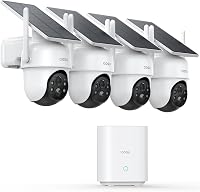
- Wireless, solar and battery cameras
- Wired vs wireless, and PoE vs Wi-Fi
- How many cameras and how much storage
- Monitors, internet and local viewing
- Resolution: is 4K worth it?
- Outdoor placement and mounting
- Brand matchups
- Reviews of individual kits
- How to choose a system
- Common mistakes with no-subscription systems
- Keeping a system running for years
- Setup, privacy and safety
- Guides, comparisons and reviews on this site
- Where to start
A security camera without a subscription keeps its footage on a card, a base unit or a drive in your home. No monthly plan is needed to keep the recordings.
This guide explains the kit types, the storage and power choices, and where to start.
Most of the confusion comes from cloud plans. Many camera apps offer a paid plan for cloud storage, but a local system works without one.
The sections below show how to tell the two apart before you buy.
What a security camera system without subscription includes
A no-subscription system has three parts: the cameras, a place to store the video, and a way to watch it. The storage can be a micro SD card in a camera, a base unit, a network video recorder or a DVR.
Each option keeps the footage in your home.
You pay once for the hardware. Ongoing costs are limited to electricity for plug-in or wired parts and, for some kits, a battery or panel replacement after several years.
Where the footage is stored
Local storage keeps recordings on your own equipment. That's the core of a no-subscription system, and it's the first thing to check on any kit.
Storage size decides how many days you can look back. A small card holds days of footage, a 1TB or 2TB drive holds much more, and the resolution and recording mode change the number again.
Our hard drive guide for a security camera system explains how to size the drive. Read it before you choose a recorder.
Wired, PoE and plug-in kits
Wired kits run a cable from each camera to a recorder. A DVR records analog cameras, while an NVR records network cameras, and a PoE kit sends power and video over one Ethernet cable.
Wired kits give steady recording, since they don't depend on a battery or the sun. They do need cable routes, so plan the path before you buy.
Start with what a PoE camera system is and how it works if the terms are new. The best wired security camera system list covers the common kits, and the best PoE camera systems list covers the network-camera side.
Do PoE cameras need internet?
A PoE system records without internet, since the video goes straight to the recorder over the cable. Remote viewing and phone alerts need a connection at home.
Our guide to PoE cameras and internet explains the NVR side in more detail. For the install steps, read how to install a PoE camera system at home.
Wireless, solar and battery cameras
Wireless cameras skip the cable, but each one needs power. Solar panels and rechargeable batteries are the common choices, and some kits use a plug-in adapter where an outlet sits near the mount.
Wireless kits send video to a base unit or phone over Wi-Fi. Walls and distance weaken that link, so check the signal at each mount spot.
Our solar security camera system page covers the sun needs, and the best wireless security camera system list covers the wire-free kits. For Wi-Fi questions, see do security cameras need Wi-Fi to work.
Wired vs wireless, and PoE vs Wi-Fi
Wired systems suit steady recording and a house that can take cable. Wireless systems suit a house where cable is hard to run, but they need charging or a power source at each camera.
PoE and Wi-Fi are both types of network camera, but they differ in power and link. A PoE camera takes power and video from one cable, while a Wi-Fi camera needs its own power source and a Wi-Fi signal.
Read the wired vs wireless security cameras comparison for the general trade-offs. For the network side, read PoE vs Wi-Fi camera systems.
How many cameras and how much storage
Count the entry points first, then add the driveway, the side gate and the back yard. Most homes land between four and eight cameras, but a small home can start with two.
Storage follows the camera count. More cameras record more footage, so a bigger drive or a shorter recording window keeps the system within your storage limit.
Our guide to how many security cameras a house needs walks through the counting step. The hard drive guide covers the storage math.
Monitors, internet and local viewing
A monitor is optional. Many systems show live video in a phone app, but a monitor on the recorder gives a live view without a phone.
A system can work without internet for local viewing and recording, but remote access needs a connection. Read can a security camera system work without internet for the full picture, and do you need a monitor for a security camera system for the monitor question.
Resolution: is 4K worth it?
Higher resolution shows more detail at a distance, such as a face or a plate. It also fills the drive faster, so it needs more storage for the same number of days.
For a close entry, 2K is often enough. For a wide driveway or a long property line, 4K gives you more to work with when you review footage.
Our 4K vs 2K guide explains the trade-off, and the best 4K security camera systems list covers the kits.
Outdoor placement and mounting
Outdoor cameras need a height and an angle that show the approach without glare. A camera aimed into a bright light or a lamp will struggle after dark.
Read where to put outdoor security cameras around a house for mount spots and angles. The best home security camera systems list shows which kits fit a mixed setup of indoor and outdoor cameras.
Brand matchups
Brands differ in app quality, recorder design and the cameras they sell for each kit. A matchup helps when two systems look alike on the shelf.
Compare Eufy vs Reolink, Reolink vs Hiseeu and ANNKE vs Reolink for the three most common matchups. Each one looks at the kit line, the recorder and the camera options side by side.
Reviews of individual kits
A review goes deeper on one kit. It covers the camera count, storage, power, cable needs and the trade-offs for a home install.
Start with the ANNKE 3K Lite wired camera system review for a DVR kit. The Reolink RLK8-800D4 review covers a PoE kit, the Hiseeu 3K PTZ review covers a wired DVR kit with pan and tilt cameras, and the aosu D1 Classic review covers the solar kit.
How to choose a system
Start with the room you have: the cable routes, the outlets and the sun. Then pick the storage, the camera count and the detail you need.
Our guide to choosing a home security camera system gives a step-by-step route. The types of security camera systems page explains each kit type in plain terms.
Security cameras without subscription: a quick checklist
Check that the basic recording works without a cloud plan. Confirm the storage size and the days it holds at your settings.
Match the power to the mount spot. Check the Wi-Fi signal or the cable route before you drill.
Then read the reviews and roundups for the kits that fit your home.
Common mistakes with no-subscription systems
The first mistake is buying on camera count alone. A kit with more cameras can still fall short if the recorder can't store the days you want or a cable route doesn't reach a spot.
The second mistake is skipping the power check. A solar camera in a shaded spot will run low, and a plug-in camera needs an outlet within reach of the bracket.
A third mistake is assuming every feature is free. Check that the core recording works on the kit as sold, and read the maker's notes on optional plans before you commit.
Keeping a system running for years
Check the storage once or twice a year. A drive that fills up quietly can stop recording the days you expect, so review the oldest saved footage and the free space.
Clean the lenses and check the mounts after storms. Replace batteries on schedule, and keep the solar panels clear of leaves, dust and snow.
Keep the firmware current on the recorder and the cameras. Updates often fix security issues, so install them when the maker releases them.
Setup, privacy and safety
Change the default password on the recorder or base unit before you connect it to your router. Keep the firmware up to date, and use a strong password for the phone app.
Keep recorders indoors in a dry, ventilated spot. Use weatherproof boxes for outdoor connections, and hire a licensed electrician for any cable that runs through a wall or near a main power line.
Guides, comparisons and reviews on this site
Use this index to move to any guide on this site. Each page covers one question or one kit, so start with the topic closest to your home.
- What Is a PoE Camera System and How Does It Work?
- Do Security Cameras Need WiFi to Work?
- Do PoE Cameras Need Internet or an NVR?
- How Many Security Cameras Does a House Need?
- Hard Drive for a Security Camera System: What Size?
- How to Install a PoE Camera System at Home
- Outdoor Security Camera Placement: Where to Put Cameras
- Security Camera System With Monitor: Do You Need One?
- Can a Security Camera System Work Without Internet?
- Are 4K Security Cameras Worth It Over 2K?
- Best Security Cameras Without Subscription
- Best Outdoor Security Cameras Without Subscription
- Best Wired Security Camera Systems for Home
- Best PoE Camera Systems for Home
- Best Wireless Security Camera Systems for Home
- Best 4K Security Camera Systems
- Best Solar Security Camera Systems for Outdoors
- Best Home Security Camera Systems
- Wired vs Wireless Security Cameras: Which Is Better?
- PoE vs Wi-Fi Camera Systems: What Is the Difference?
- Eufy vs Reolink Camera Systems
- Reolink vs Hiseeu Camera Systems
- ANNKE vs Reolink Security Camera Systems
- ANNKE 3K Lite Wired Security Camera System Review
- Reolink RLK8-800D4 4K PoE Camera System Review
- Hiseeu 3K PTZ Wired Security Camera System Review
- aosu D1 Classic 4-Cam Solar Camera Kit Review
- How to Choose a Home Security Camera System
- Types of Security Camera Systems Explained
Where to start
If you want no monthly fee and a house that can take cable, start with a wired kit and a local recorder. If cable is hard to run, start with a solar or battery kit and check the sun at each mount spot.
For a first pick, read the best security cameras without subscription list, then check the outdoor picks if the cameras go outside. Keep the storage, power and cable plan in mind as you compare, and the right kit usually becomes clear.
Frequently asked questions
Can a security camera system work with no monthly fee?
Yes, as long as the system saves video to a card, a base unit or a hard drive you own. Some makers also sell optional cloud plans, so check that basic recording works without one.
Do no-subscription cameras need Wi-Fi?
Wireless kits need Wi-Fi to send video to a base unit or phone. Wired kits can keep recording without internet, but remote viewing and phone alerts need a connection.
Which type of no-subscription camera is best?
It depends on where the cameras go. Solar kits suit a sunny yard, PoE and DVR kits suit a house with cable routes, and plug-in kits suit a spot near an outlet.