Types of Security Camera Systems Explained
The main types of security camera systems are wired DVR and NVR kits, PoE kits, plug-in Wi-Fi kits, and battery or solar kits. Each type trades cable work, power and storage differently, so the cable routes and sun at your home decide which one fits.
On this page (20 sections)
- Wired DVR kits
- PoE and NVR kits
- Plug-in Wi-Fi cameras
- Battery and solar kits
- Analog and TVI kits
- Hub-based kits
- Hybrid kits that mix types
- Types of security camera systems compared on cable, power and storage
- Wired or wireless: the bigger choice
- Power outages and backup
- Install effort by type
- Which type suits which home
- Two-way audio and sound
- Alerts and battery life
- Recording modes by type
- Choosing by the rooms you need to watch
- Quick checklist for picking a type
- Storage at a glance by type
- Mixing a DVR with a wireless camera
- Next steps
Security camera systems come in a few main types, and each one solves a different install problem. The type decides how the cameras get power, how they send video and where the footage is stored.
This guide explains each type in plain terms, so you can match one to your home.
Start with the cable routes and the sun at each spot. Those two facts rule out some types before you compare any brand.
Wired DVR kits
A DVR kit uses analog cameras that run a cable back to a digital video recorder. The DVR stores the footage on a hard drive, and it often has an HDMI or VGA output for a TV or monitor.
DVR kits suit a home that can take cable and wants local recording. They keep recording when the internet drops, since the recorder handles the storage.
Our best wired security camera system roundup covers DVR kits in more detail. It lists the camera count and drive size for each kit we picked.
PoE and NVR kits
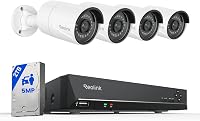
A PoE kit sends power and video over one Ethernet cable to each camera. The network video recorder, or NVR, stores the footage on its drive.
PoE is steady and tidy, since one cable does both jobs. It suits a home where cable can run through an attic, a basement or a garage.
Our guide to what a PoE camera system is explains how the parts connect. The best PoE camera systems for home roundup covers the kits we picked for this type.
Plug-in Wi-Fi cameras
A plug-in Wi-Fi camera runs on a power adapter and connects to your router over Wi-Fi. It often stores video on a microSD card or a base unit.
Plug-in cameras suit a spot near an outlet, such as a garage wall or a back door. They skip the cable run to a recorder, but the Wi-Fi link needs a strong signal at the mount.
Read do security cameras need Wi-Fi to work for the Wi-Fi side. It covers which kits need a connection and which can record without one.
Battery and solar kits
Battery and solar kits run without a power cable. A solar panel keeps the battery charged in the sun, and a battery-only camera needs a recharge on a schedule.
These kits suit a yard or a porch where cable is hard to run. They need a sunny mount for solar, or a plan for regular charging for battery models.
Our solar security camera system page covers the sun needs in more detail. Read the best wireless security camera system list for the wire-free picks.
Analog and TVI kits
Analog camera kits send video over a coaxial-style cable to a DVR, and TVI is one common analog format. The Hiseeu 4K kit uses TVI, so its cameras and recorder work as one matched set.
Analog kits can suit a home that already has the cable in place. Check that the recorder and the cameras use the same format before you add a camera, since mixed formats won't always work together.
Hub-based kits
Some Wi-Fi camera kits use a hub or base unit that stores video and links the cameras. The base handles the storage and the connection to your router, so the cameras stay simple.
Reolink's Lumus works with the Reolink Home Hub and Reolink NVRs, which store footage for the camera. Check which hub or recorder the camera supports before you buy it.
Hybrid kits that mix types
A hybrid kit mixes a wired camera with a wireless one, or a PoE recorder with a Wi-Fi camera. Hybrids can cover a home where cable reaches some spots but not others.
Check the recorder's inputs before you buy a hybrid. The recorder has to accept both types, and the app has to show both feeds.
Types of security camera systems compared on cable, power and storage
Wired DVR and PoE kits need cable to each camera, and they store video on a recorder. Plug-in kits need an outlet at each camera, and they often store video on a card or base.
Battery and solar kits need no power cable, but they depend on charge and sun. Their storage ranges from a small card to a base unit, depending on the kit.
Use this list as a quick check before you read the full type sections.
- Wired DVR: cable to each camera, drive in the recorder, steady power.
- PoE NVR: one Ethernet cable per camera, drive in the recorder, steady power.
- Plug-in Wi-Fi: outlet at each camera, card or base storage, Wi-Fi link.
- Battery or solar: no power cable, charge or sun needed, card or base storage.
Wired or wireless: the bigger choice
The first split is wired or wireless. Wired kits, including DVR and PoE, give steady recording.
Wireless kits, including plug-in Wi-Fi and battery or solar, give easier installs.
Our wired vs wireless security cameras comparison goes deeper on that choice. It covers the trade-offs in recording, power and install effort, and PoE vs Wi-Fi camera systems covers the network side.
Power outages and backup
Wired recorders and NVRs need power to record, so a short outage can stop footage until the unit restarts. A battery backup can carry the recorder through short outages.
Solar and battery cameras keep their own power, but they still need a charge to run. A plug-in camera stops when its outlet loses power, so both the recorder and the camera need backup if you want steady recording.
Install effort by type
Plug-in and battery cameras are the quickest to mount, since they need no long cable run. Solar cameras need a sunny spot and a mount that keeps the panel facing the sky.
Wired DVR and PoE kits take the most planning, since each camera needs a cable run. The payoff is steady power and a recorder that handles the storage in one place.
Which type suits which home
A home with cable routes and a desire for steady recording suits a DVR or PoE kit. A home where cable is hard to run suits a plug-in or wireless kit.
A home with a sunny yard and few outlets suits a solar kit. A home with an outlet near the door suits a plug-in camera for that spot.
Types of security camera systems for a rental or small home
A rental usually limits cable work, so a battery or plug-in camera is often the easiest start. Choose a camera you can remove when you move, and keep the mount holes small.
A small home may need only two or three cameras. A plug-in or solar pair covers the front door and a side approach without a cable run through the house.
Two-way audio and sound
Some kits record sound and let you talk through the camera. Reolink's RLK8-520D4 records audio, and the CasaCam Air lets you hear and speak with people at the property.
Audio is a feature of the camera or the recorder, not the type. Check each model's sound settings before you buy, since one-way audio and two-way audio work differently.
Alerts and battery life
Alerts send a message to your phone when the camera sees motion. A wired kit doesn't rely on a battery, so its alert settings are the main thing to review.
Battery and solar cameras need a charge to send alerts reliably. Frequent alerts use more power, so check the sensitivity and the time window before you rely on a battery camera at a busy door.
Recording modes by type
Continuous recording saves footage around the clock, and it fills storage fastest. Motion recording saves only when the camera sees movement, which keeps more days on the same drive.
Wired recorders often give both modes, and wireless kits may limit the choice. Pick the mode that fits your storage plan, then check how many days it keeps.
Choosing by the rooms you need to watch
Start with the rooms and doors you need to see most, then match the type to each spot. A front door with an outlet suits a plug-in camera, while a back yard with a sunny fence suits a solar camera.
A home with several spots that need cable runs suits a DVR or PoE kit. A rental with a few doors suits plug-in or battery cameras that you can move later.
Quick checklist for picking a type
- Walk each mount spot and note the power there.
- Mark the cable routes you can use without damage.
- Check the sun for any solar camera.
- Pick the storage you need and where it lives.
- Decide whether you need a monitor or a phone app.
- Confirm the type works with the recorder and cameras you plan to buy.
Storage at a glance by type
Wired DVR and PoE kits keep footage on a drive in the recorder, so the drive size sets the days. Plug-in cameras often use a microSD card or a hub, and the card size sets the days for each camera.
Battery and solar kits keep footage on a card or a base unit, which usually holds less than a recorder drive. Check the storage figure for each kit, then match it to the days you want.
Mixing a DVR with a wireless camera
Some homes run a wired DVR for the main doors and add a wireless camera for a spot the cable can't reach. That mix works only if the DVR accepts the wireless camera's signal, so check the DVR's camera inputs before you buy.
If the mix is planned from the start, pick one recorder brand for the whole set. Matching the software and the app keeps the setup simpler than a patchwork of separate apps.
Next steps
If you already know the spots and the power, pick the type that matches them. Then move to the buying guide and the roundups for the kits that fit that type.
Our how to choose a home security camera system guide walks through the steps in order. For the full list of no-subscription kits, read the no-subscription pillar guide.
Frequently asked questions
What are the main types of security camera systems?
The main types are wired DVR and NVR kits, PoE kits, plug-in Wi-Fi cameras, and battery or solar kits. Each one differs in cable work, power source and where it stores video.
Which type is easiest to install?
A battery or solar camera is often the quickest, since it needs no power cable. A wired kit takes more planning, but it runs steadily once the cable is in place.
Which type records without a subscription?
Most types can, if the storage is in your home. Wired recorders, base units and cameras with a microSD card can all keep footage without a cloud plan.