Do Security Cameras Need WiFi to Work?
Wired kits don't need wifi to record, but wireless cameras need a link to your router or a base hub. You only need internet for watching from outside the house and for most phone alerts.
On this page (9 sections)
- Do wired security cameras need Wi-Fi?
- When wireless cameras depend on Wi-Fi
- What to check on your wifi before you buy
- How a base hub connects wireless cameras
- Can a camera record without a Wi-Fi link?
- Does Wi-Fi need internet?
- What a wireless camera sends, and when
- Questions to ask before you buy a wireless kit
- Which setup should you pick?
Do security cameras need wifi? Wired kits record without it, but wireless kits need a link to your router or a base hub.
This guide shows which setup needs what, so you can plan the spot before you buy.
Do wired security cameras need Wi-Fi?
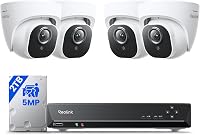
No. A wired kit records through a cable, and the recorder keeps the footage on its own drive, so your wireless network never has to carry the video.
Wired kits still need power and a recorder. Plug the recorder into a standard outlet and keep it somewhere dry and ventilated.
When wireless cameras depend on Wi-Fi
A wireless camera sends its video over Wi-Fi. A weak signal means choppy live view, delayed alerts or clips that don't upload.
Wi-Fi also limits where the camera can sit. The farther it is from the router, and the more walls and metal it passes through, the weaker the link gets.
Do security cameras need Wi-Fi for remote viewing?
Remote viewing needs Wi-Fi or a wired link to the router at home, plus an internet connection. Without that link, the cameras can still record on the recorder, but you can't see them from work or a trip.
Check the signal before you mount anything by standing at the spot with your phone. If the signal is weak, move the router, add a range extender or choose a kit with a base hub.
What to check on your wifi before you buy
Start with the router. Check which bands it runs, since 2.4GHz reaches farther through walls and 5GHz is faster over short distances.
Next, measure the distance from the router to each mount, and count the walls, brick and metal siding in between. Each of those cuts the signal.
Keep the network secure too. Use a strong Wi-Fi password, and update the router's firmware, since the cameras share the network with your phones and laptops.
A wired kit skips these checks, which makes it the easier choice for a spot you can't reach with a strong signal.
How a base hub connects wireless cameras
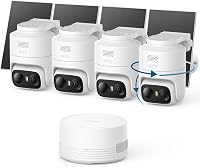
Some kits skip home Wi-Fi for the cameras. aosu says its D1 Classic cameras link to the aosuBase instead of your home Wi-Fi, and the base plugs into the router's LAN port with an Ethernet cable.
That setup keeps the cameras off your home network, but the base still needs a wired link to the router. Put the base within reach of that cable, and keep the cameras within the range the maker lists.
Can a camera record without a Wi-Fi link?
Some can. Camcamp says its plug-in cameras can pair with the recorder over 2.4 or 5GHz Wi-Fi, or run standalone on a microSD card.
Standalone storage means the camera keeps its own footage, so the recorder isn't always needed. Check the manual for each kit to see how it handles footage when the link drops.
Does Wi-Fi need internet?
Wi-Fi and internet are two separate things. Your cameras can talk to each other and to the recorder over your home network without internet access.
Internet comes into play when you want to watch from outside the house. Most phone alerts also go through the app's servers, so they need internet at home to arrive.
What a wireless camera sends, and when
A wireless camera sends three kinds of traffic over its link. Live view streams while you watch, clips upload after motion, and alerts go out as short messages.
Live view needs the most bandwidth, so a weak link shows up there first. Clips and alerts are smaller, so they often get through when the live view stutters.
A long clip recorded at night can take longer to upload on a busy network. Turning off live view on cameras you only check at night keeps more of your Wi-Fi free for the rest of the house.
Questions to ask before you buy a wireless kit
Ask the maker where the video goes, whether footage stays on the base or recorder, and what happens if the link drops. The answers tell you whether the kit fits your router and your storage needs.
Ask whether the kit links cameras through your router or through its own base. A base that connects separately can keep the cameras off your home network, but it still needs a wired or Wi-Fi link to reach the router.
Ask how many cameras the base or recorder supports. Plan for a few more than you need today, so adding a camera later doesn't mean a second hub.
Which setup should you pick?
Pick a wired kit if you can run cable and want recording that never depends on Wi-Fi. Pick a wireless kit if running cable isn't practical, and place the router or base where the cameras can reach it.
Think about power too. Battery and solar cameras still need a link, so the wire question and the power question are separate.
If you're leaning wired, read our PoE camera internet and NVR guide next. For whole kits, the best wireless security camera systems roundup and the solar security camera system picks show how the links differ in real kits.
If you want to know how a system works without internet at home, read can a security camera system work without internet before you buy.
The short rule is simple. Wired recording doesn't need Wi-Fi, and wireless recording does, so check your router before you choose a kit.
Frequently asked questions
Do security cameras need Wi-Fi to record?
Not always, since a wired kit records over a cable to its own recorder, so Wi-Fi isn't part of that path. A wireless kit needs a link, either Wi-Fi to your router or a base hub, to send its video to the recorder or your phone.
Can a security camera work without internet?
Yes, many kits record and show live video on your home network without any internet connection. Internet is needed for watching from outside the house, for most phone alerts, and for app and firmware updates from the maker, so plan a home connection if you want those features.
Do solar security cameras need Wi-Fi?
Most solar kits still link to a base or your router, so they need a signal of some kind, even on a sunny day. The solar panel only charges the battery, and the camera still needs a connection to send its video.
Do wired cameras need Wi-Fi at all?
Not for recording, since the cable carries the video and the recorder keeps the footage on its own drive. Some recorder-based kits add Wi-Fi as an option for remote viewing, and you can skip that option if you only watch from home.