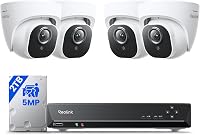
Can a Security Camera System Work Without Internet?
Yes, a security camera system can record without internet, because the cameras and recorder save footage on site. Remote viewing and phone alerts do need a connection, so an offline system works at home but not from far away.
On this page (11 sections)
- What works without internet in a security camera system
- What needs a connection
- Wired kits that record offline
- PoE kits and the NVR
- Wireless kits and the Wi-Fi link
- Signs your system needs a connection
- Storage limits for offline recording
- Setting up an offline system
- Offline recording and privacy
- Checking the local view before you rely on it
- Which offline setup to choose
Yes, a security camera system can work without internet for recording and local viewing. The cameras and the recorder save footage on site, so the connection doesn't stop the recording.
Remote viewing and phone alerts are the parts that need a connection.
This page explains what works offline, what doesn't, and how to set up a system for a home with little or no internet.
What works without internet in a security camera system
Recording works offline on most wired systems. The camera sends video to the recorder over a cable, and the recorder saves it to its drive.
A monitor or TV connected to the recorder also shows live video offline. That's the simplest way to watch a system when the connection is down or missing, and our guide on whether you need a monitor for a security camera system covers the options.
What needs a connection
Remote viewing needs the recorder to reach your phone through your router and the internet. Without that path, you can't see the cameras from outside the house.
Phone alerts also need a connection. The recorder can detect motion and record it offline, but the push alert reaches your phone only when the link is up.
Wired kits that record offline
A DVR kit records to its own hard drive and shows live video on a TV through an HDMI or VGA output. The VORGUT kit has both HDMI and VGA outputs, and its drive records locally.
The ANNKE 8-channel kit also has an HDMI output and a 1TB drive. It keeps recording whether or not the router is connected.
PoE kits and the NVR
A PoE system sends video to an NVR over an Ethernet cable. The NVR records to its drive, so the recording doesn't depend on the router.
Hiseeu says its PoE PTZ system can work without internet for a local TV monitor. That's the maker's claim, so check the local view on your own setup before you rely on it.
Wireless kits and the Wi-Fi link
Wireless cameras send video to a base unit or hub over Wi-Fi. That local link can work without internet, but many kits route the base through the router anyway.
Check the kit's setup steps for an offline mode. If the base unit needs the internet to finish setup, plan the install with a connection first.
Signs your system needs a connection
Some features quietly need the internet, such as cloud backup, remote playback and firmware updates. Check the setup notes for each one before you rely on the system without a connection.
If the app asks for an account during setup, the system may need the internet to finish. Plan the first setup with a connection, then move the recorder to its offline spot.
Storage limits for offline recording
An offline system keeps only as much footage as its drive allows, and nothing backs it up off site. A 1TB drive holds many days of footage at moderate settings, while a 500GB drive holds fewer.
Check the drive size and the recording mode before you decide how far back the system can look. Motion recording stretches the days on the same drive.
Setting up an offline system
Set up the system while the internet is working. Add the cameras, set the recording mode and test the local view on a TV or monitor.
Change the default password on the recorder before you disconnect it from the router. Store the recorder in a dry, ventilated spot indoors, and keep it powered on a battery backup if outages are common.
Security camera system without internet: what to check first
Check the storage size and the number of days it holds. An offline system is only as useful as its drive, since the footage stays on that drive.
Check the outputs on the recorder, such as HDMI or VGA. Check whether the app needs a connection for setup, and whether the recorder can send alerts without one.
Offline recording and privacy
An offline system keeps footage in the house, which many buyers prefer. Only the people with access to the recorder can view the footage locally.
Keep the recorder's password and the phone app password strong and different. Review the sharing settings in the app, and remove access for anyone who no longer needs it.
Checking the local view before you rely on it
Connect the recorder to a monitor or TV and look at each camera in the local view. Check the night view as well, since the picture can differ after dark.
Then check playback. Pull up a clip from earlier in the day and confirm the time stamp and camera name match what you expect.
Which offline setup to choose
For a home that rarely has internet, a DVR or NVR kit with a TV output is the most direct choice. It records and shows live video without any network path.
For a home with a stable connection, a wireless or PoE kit gives you remote viewing as well. Read do security cameras need Wi-Fi to work for the Wi-Fi side, and do PoE cameras need internet or an NVR for the recorder side.
For a full list of no-subscription kits, see the best security cameras without subscription roundup. It covers which kits keep footage locally.
Frequently asked questions
Does a security camera system need internet to record?
No, wired and local systems record to a drive or card in the house, so recording continues without internet. Remote viewing and phone alerts need a connection.
Can I watch an offline system from another city?
Not without a connection. Remote viewing depends on the recorder reaching your phone through your router and the internet.
Will an offline system still record during an internet outage?
Yes, if the recorder and cameras have power. The footage stays on the local drive, and remote viewing and alerts resume once the connection returns, though alerts from the outage may not be sent.