5 Best Wireless Security Camera Systems for Home (October 2026)
The best wireless security camera systems include the eufy C37 4-Cam Wireless Kit for a home base with local storage, the Camcamp 4 Plug-in Camera System for a recorder with a monitor hookup, and the ANNKE Wireless 4K NVR Camera System for pan and tilt across four cameras.
On this page (8 sections)
- How wireless cameras send video and get power
- The five wireless kits in order of score
- How we picked these five
- Side by side: wireless kits by power, storage and camera count
- Local storage or cloud for wireless cameras
- Wi-Fi and the wireless link
- Setting up a wireless security camera system
- Which wireless security camera system should you buy?
The eufy C37 is the top wireless pick here, and the other four cover recorder kits and battery installs. Each one links to its recorder or base without a cable run back to the house, so the setup can be quicker.
Wireless describes how video travels, not how the camera gets power. Most of the five kits still need a battery, a solar panel or a plug.
We compared the five kits on how they link, where footage is stored, how they're powered and how each one installs. The picks below run from a battery kit with no wiring to a recorder with a monitor output.
How wireless cameras send video and get power
A wireless camera sends its video by Wi-Fi or to a base hub. Its power comes from a battery, a solar panel or a plug, and that choice sets where you can mount it.
The link decides whether you need a router or base nearby. The power decides how often you'll charge and whether you need an outlet.
Battery cameras need recharging
Battery cameras skip the outlet, which makes mounting easier. GMK says its battery runs 1 to 6 months on standby, depending on how often the camera records.
Plan a recharge schedule before you mount, and keep a spare battery if your kit includes one. A spot with heavy motion uses more power.
Plug-in cameras need an outlet
Plug-in cameras give steady recording, since power never runs low. Camcamp and ANNKE both use plug-in cameras, so each mount needs an outlet close by.
Our picks at a glance
-
1

-
2
 Best for a recorder with a monitor hookup
Camcamp 4 Plug-in Camera System
8.0/10 our score
See it on Amazon -
3
 Best for pan and tilt across four cameras
ANNKE Wireless 4K NVR Camera System
7.9/10 our score
See it on Amazon
- 4
 Check it
Hiseeu 5MP Wi-Fi Camera System with 500GB Drive
Best for a drive that's ready out of the box - 5
 Check it
GMK 4 Pack Wireless Camera System
Best for a battery install with no wiring
The five wireless kits in order of score
Each kit below is ranked by its score. The top pick combines a home base, pan and tilt coverage and local storage.
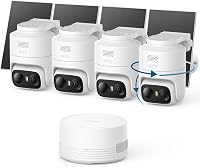
eufy C37 4-Cam Wireless Kit
- 2K cameras with pan, tilt and auto tracking
- HomeBase Mini with 64GB built in
- Storage up to 1TB with a microSD card, sold separately
- Detachable solar panels on each camera
A wireless kit that covers a yard from one spot, with footage stored at home in the base. Eufy says there are no monthly fees, and the base connects up to 10 cameras.
Pros
- Pan, tilt and auto tracking from each camera
- Footage stays in the home base, per eufy
- Solar panels detach for better placement
Cons
- Storage beyond 64GB needs a microSD card, sold separately
- Battery cameras need charging or steady sun
eufy's C37 kit is the top pick here, because it covers a whole yard from one spot. Each camera pans and tilts, and auto tracking follows people and vehicles across the frame.
The kit includes a HomeBase Mini with 64GB built in. Eufy says the base can take a microSD card up to 1TB, sold separately, so storage can grow.
Eufy says there are no monthly fees and that the base connects up to 10 cameras in one app. Each solar panel detaches, so you can point it at the sun while the lens faces the yard.
The 2K picture adds detail to faces and plates, and the built-in spotlight helps at night.
The cameras use a 2.4GHz Wi-Fi link, so check the signal at the base before you mount. They also save motion events rather than recording around the clock.
The trade-off is storage. The 64GB built in covers a short window of footage, and a larger card costs extra.
For a head-to-head with a Reolink solar kit, read eufy vs Reolink.
Camcamp 4 Plug-in Camera System
- Four dual-lens PTZ cameras
- 10-channel NVR with a 500GB drive
- HDMI output for a monitor
- IP66 rated, with a stated range of -22 F to 122 F
A recorder kit that pairs four pan and tilt cameras with a 10-channel NVR and a monitor output. Camcamp says it records 24/7 with no monthly fees.
Pros
- Recorder and cameras in one box
- HDMI output for watching on a monitor
- Can run standalone on microSD if needed
Cons
- Each camera plugs into an outlet, so mounts need power nearby
- The 500GB drive is the smallest in this group
Camcamp's kit is the pick for a recorder with a monitor hookup. Four dual-lens cameras pair with a 10-channel NVR, and the recorder ships with a 500GB drive.
Each camera has a wide-angle lens and a pan and tilt lens, and the two views show on one split screen. Camcamp says auto tracking follows movement across a 355-degree pan and a 90-degree tilt.
The NVR has an HDMI output, so you can watch the cameras on a monitor, and our guide on whether you need a monitor covers when that helps. Camcamp says the system records 24/7 with no monthly fees, and clips can go to your phone or a USB drive.
The cameras link to the NVR over 2.4 or 5GHz Wi-Fi, or they can run standalone on a microSD card. The IP66 rating and a stated range of -22 F to 122 F suit most outdoor spots.
Each camera plugs into power, so you need an outlet near every mount. The 500GB drive is the smallest in this group, and the NVR expands to 6TB if you add a larger drive.
ANNKE Wireless 4K NVR Camera System
- Four dual-lens cameras with 350 degree pan and 90 degree tilt
- 10-channel 4K NVR with a 1TB drive
- AI human detection with smart auto tracking
- Dual-band 2.4GHz and 5GHz Wi-Fi
Four pan and tilt cameras on a 4K NVR, with human detection and six preset positions. ANNKE says the NVR has no subscription fees and takes up to 8TB of added storage.
Pros
- Wide pan and tilt coverage from four cameras
- Smart auto tracking with six presets
- Drive upgrade to 8TB, per ANNKE
Cons
- The 4K name refers to the NVR, while each camera gives a 4MP total view
- Cameras plug in, so each mount needs an outlet
ANNKE's wireless 4K kit is the pick for pan and tilt across four cameras. Each camera has one fixed wide-angle lens and one pan and tilt lens, so you see more of the yard from each mount.
Smart auto tracking follows detected movement, and you can save up to six preset positions. AI human detection works with motion alerts, so fewer alerts come from leaves or passing animals.
The 10-channel NVR includes a 1TB drive, and ANNKE says the recorder takes up to 8TB of added storage. ANNKE also says the system has no subscription fees, and dual-band Wi-Fi links the cameras to the NVR.
Two-way audio is included. Rules on recording audio vary by state, so check local law before you turn it on.
The name says 4K, but that refers to the recorder. Each camera gives a combined 4MP view, so the picture is less sharp than a true 4K camera.
The cameras also plug in, so plan an outlet at each mount.
Hiseeu 5MP Wi-Fi Camera System with 500GB Drive
- Four 5MP wireless cameras
- 500GB hard drive pre-installed
- 10-channel NVR that takes more cameras
- Floodlights for color night vision
A four camera Wi-Fi kit with a drive already in the recorder. Hiseeu says the drive holds more than 45 days of footage, which depends on your settings.
Pros
- Drive ready out of the box
- Recorder takes more cameras later
- Floodlights add color at night
Cons
- The 500GB drive holds the least footage in this group
- Each camera plugs into an outlet, even though the link is Wi-Fi
Hiseeu's Wi-Fi kit is the pick for a drive that's ready out of the box. It includes four 5MP wireless cameras and a recorder with a 500GB drive already installed.
The recorder has 10 channels, so you can add more cameras later. Hiseeu says the drive holds more than 45 days of footage, though the real number depends on your settings.
The cameras link to the recorder over Wi-Fi but still plug into power, so each mount needs an outlet. The app supports remote viewing and two-way audio, and floodlights on the cameras add color at night.
The 5MP cameras give more detail than the 2K picks in this roundup. Four cameras cover the main spots, so a larger house will need more cameras.
The 500GB drive is the smallest in this group, so footage history will be shorter than the larger kits. Check the drive size against how long you want to keep footage.
GMK 4 Pack Wireless Camera System
- Four wire-free battery cameras
- 2K 3MP video with color night vision
- Memory card storage, with an optional cloud plan
- Two-way talk and a siren alarm
The simplest install here, since the cameras run on rechargeable batteries and need no recorder. GMK offers a memory card or an encrypted cloud plan, with a 7-day trial for new users.
Pros
- No recorder and no cable runs
- Memory card storage is available
- Two-way talk and a siren alarm
Cons
- Battery cameras need recharging on a schedule
- The cloud plan is an extra after the trial
GMK's kit is the simplest install in this list. Four cameras run on rechargeable batteries, and each one mounts without a recorder or a cable run.
GMK offers 2K 3MP video with color night vision, plus an intelligent siren alarm. Each camera uses PIR motion detection to send alerts to your phone.
Storage is a choice at setup. You can use a memory card of up to 128GB for local footage, or GMK's encrypted cloud service, which includes a 7-day free trial for new users.
The box doesn't list a card, so budget for one.
Two-way talk works through the app, so you can speak to someone at the door. GMK says the battery lasts 1 to 6 months on standby, depending on use.
The trade-off is recharging. Battery cameras need charging on a schedule, and the cloud plan is an optional extra after the trial.
How we picked these five
We compared each kit on its power source, storage, camera count, resolution and setup. Our score weighs specs, features and buyer feedback against what you're shopping for.
The five scores fall in this order:
- eufy C37, 8.6: pan and tilt coverage, a home base and local storage.
- Camcamp, 8.0: a recorder with a monitor output and 24/7 recording.
- ANNKE wireless 4K, 7.9: four dual-lens cameras with auto tracking and a 1TB NVR.
- Hiseeu Wi-Fi, 7.7: a drive ready out of the box and a recorder that takes more cameras.
- GMK, 7.2: the simplest install, with batteries and no recorder.
The scores favor kits that cover more of a yard, keep footage at home and state clear power and storage numbers.
Side by side: wireless kits by power, storage and camera count
The table below puts each kit's cameras, recorder and storage in one place. Read the power row first, since it decides where you can mount.
| Product | Best for | Resolution | Storage | Power | Our score |
|---|---|---|---|---|---|
| eufy C37 4-Cam Wireless Kit | a home base with local storage | 2K | 64GB in the HomeBase Mini, up to 1TB with microSD | Battery with detachable solar panels | 8.6 |
| Camcamp 4 Plug-in Camera System | a recorder with a monitor hookup | Plug-in | 8.0 | ||
| ANNKE Wireless 4K NVR Camera System | pan and tilt across four cameras | Plug-in | 7.9 | ||
| Hiseeu 5MP Wi-Fi Camera System with 500GB Drive | a drive that's ready out of the box | Plug-in | 7.7 | ||
| GMK 4 Pack Wireless Camera System | a battery install with no wiring | Memory card, or optional encrypted cloud | Rechargeable battery, 1 to 6 months standby per GMK | 7.2 |
Two kits run on batteries, and three plug in. The eufy kit adds solar panels, so its cameras are battery units with a solar option.
Storage splits the group too. Eufy and GMK use a base or a memory card, while the Camcamp, ANNKE and Hiseeu kits use an NVR with a drive.
Local storage or cloud for wireless cameras
Local storage keeps footage in your home, on a base, a recorder or a card. Cloud storage sends clips to a company server, usually for a fee.
Eufy says its HomeBase Mini keeps footage at home rather than in the cloud. Camcamp and ANNKE both use an NVR with a drive, and GMK lets you choose a memory card or its cloud plan at setup.
For a kit with no monthly plan, look for a recorder or card that holds footage on site. Read the setup screens before you turn on any cloud option.
Wi-Fi and the wireless link
Every wireless kit needs a clear link between the camera and the recorder or router. A weak signal at the mount shows up as choppy video or missed clips.
Test the signal at each spot with your phone before you drill. Our do security cameras need wifi guide explains how the link works in each setup.
If the spot is far from the router, look at a base hub or a kit with a dedicated link. If you're also weighing a cabled PoE setup, see PoE vs Wi-Fi camera systems.
The security camera system without internet guide covers how local viewing works without a cloud connection.
Setting up a wireless security camera system
Setup starts before the drill. Pair each camera with the recorder or base while it sits on a table, then move it to the mount once the picture and signal check out.
Wireless security camera system setup checks
Change the default password on the recorder or base, and turn on two-step sign-in if the app offers it. Update the firmware on the cameras and the recorder once the setup is done.
Check the signal at each mount with your phone. Walk to the spot, then watch the live view for a few minutes to catch any drops.
Write down the Wi-Fi network name and the recorder's login details, and keep them somewhere secure. A camera that drops off the network later is much easier to fix when you know the settings.
Set the motion zones to skip the street and any neighbor's yard. Turn on alerts only for the zones that matter, since too many alerts make it easy to miss the real ones.
Test the system for a full day before you rely on it. Check the alerts at dusk, overnight and in the morning, when light and wildlife change the view.
Label each camera in the app with its spot, such as front door or side gate. Clear labels make alerts quicker to read and clips easier to find.
Which wireless security camera system should you buy?
Pick the eufy C37 for pan and tilt coverage and a home base. Pick the Camcamp for a recorder with a monitor hookup, and the ANNKE 4K kit if you want four pan and tilt cameras on one NVR.
Pick the Hiseeu kit if you want a drive ready out of the box, and the GMK kit if you want a battery install with no wiring.
Before you buy, match the power to your mounts and the link to your signal. A wireless kit works best when both are planned from the start.
For more kits that work without a monthly fee, see the best home security camera system picks, and check the solar security camera system roundup if your mounts face the sun.
Our top 3 picks at a glance
-
1
-
2
Best for a recorder with a monitor hookup
Camcamp 4 Plug-in Camera System
8.0/10 our score
See it on Amazon -
3
Best for pan and tilt across four cameras
ANNKE Wireless 4K NVR Camera System
7.9/10 our score
See it on Amazon
Frequently asked questions
What is the best wireless security camera system for a home?
The eufy C37 is the top pick here, because it pans, tilts and stores footage in a home base. A recorder kit like the Camcamp suits you if you want a monitor view, and a battery kit like the GMK suits a spot with no outlet.
Do wireless security cameras need Wi-Fi?
Most wireless kits use Wi-Fi or a base to link the camera to the recorder or your phone, and that link is separate from power. A battery or plug-in camera still needs a steady signal at its spot, so test each mount with your phone first.
Can a wireless security camera record without internet?
Many kits record to a base, recorder or memory card on your home network without internet. Internet is needed for watching from outside the house and for most phone alerts, so plan a connection at home if you want both.
Are wireless security cameras as good as wired ones?
They trade cable work for a dependence on Wi-Fi or a base link, so a wired kit gives a steadier connection. A wireless kit is faster to install at spots you can't cable, which is why many homes use a mix of both.