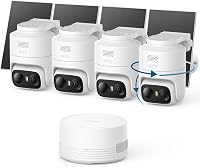
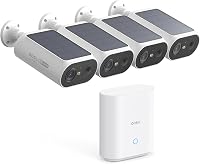
5 Best Solar Security Camera Systems for Outdoors (October 2026)
The best solar security camera systems for outdoors include the Vivideye 4MP Solar Camera System for built-in storage in the base unit, the aosu D1 Classic 4-Cam Solar Camera Kit for pan, tilt and auto tracking, and the eufy SoloCam E30 4-Cam Solar Kit for a removable solar panel and a home hub.
On this page (9 sections)
- What solar cameras need to stay charged
- The five solar kits in order of score
- How we picked these five
- Side by side: solar kits by resolution and storage
- Storage in a base or on a card
- The base hub and the Wi-Fi link
- Placing solar cameras for sun and view
- Setting up a solar security camera system
- Which solar security camera system should you buy?
The Vivideye 4MP kit is the top solar pick here, with four 4MP pan and tilt cameras and 128GB of storage in its base unit. Each kit charges from the sun, so the mount spot matters as much as the kit you choose.
Solar removes the wire to the house, but it doesn't remove the need for a link. Most solar kits use a base hub or your router to send video, and the battery depends on how much sun the camera gets.
We compared five solar kits on sun needs, storage, camera type and how each one links. The list runs from a pan and tilt kit with a base to a 4MP kit with storage built into its base unit.
What solar cameras need to stay charged
A solar camera charges its battery from a panel on the housing. The battery then runs the camera through the night and on cloudy days.
Sun hours are the main factor. The makers give different figures, so check the one for your model before you pick a spot.
Sun hours and panel angle
Aosu says its D1 Classic needs about 3 hours of direct sun a day, and its 2K kit needs about 2 hours. Eufy says 2 hours a day keeps its SoloCam E30 charged.
A panel that faces the sun for most of the day charges faster than one in shade. Aim the panel toward the sun's path, and avoid spots where trees or gutters cast a shadow.
Shade and shorter winter days
Shade from trees, eaves and nearby walls cuts the charge. Winter days are shorter too, so a battery can run low in the coldest months.
Check the battery level in the app during winter, especially for a camera that gets little sun. A camera in a shady corner may need a different spot or a larger panel.
Our picks at a glance
-
1
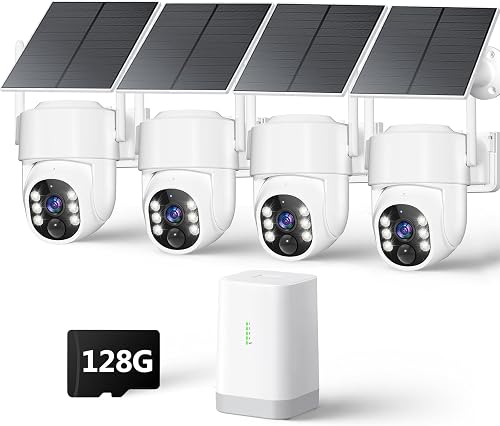 Best for built-in storage in the base unit
Vivideye 4MP Solar Camera System
8.8/10 our score
See it on Amazon -
2
 Best for pan, tilt and auto tracking
aosu D1 Classic 4-Cam Solar Camera Kit
8.5/10 our score
See it on Amazon -
3
 Best for a removable solar panel and a home hub
eufy SoloCam E30 4-Cam Solar Kit
8.4/10 our score
See it on Amazon
- 4
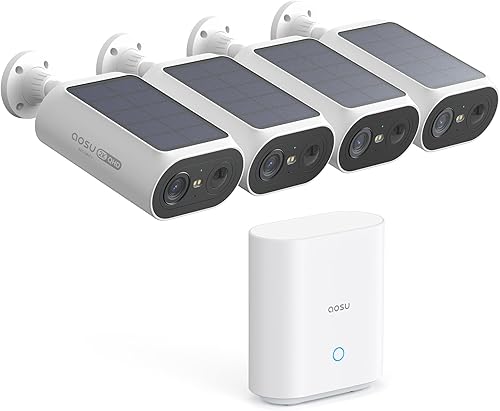 Check it
aosu 2K QHD Solar Camera System, 4-Cam Kit
Best for a fixed view of a driveway or gate - 5
 Check it
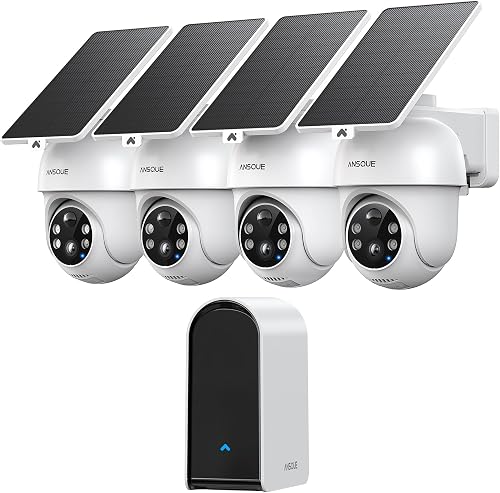
ANSQUE 4-Cam Solar Home Security System
Best for local storage that grows to 512GB
The five solar kits in order of score
Each kit below is ranked by its score. The top pick pairs the sharpest picture in this group with the most storage built into its base.
Vivideye 4MP Solar Camera System
- Four 4MP solar pan and tilt cameras
- 128GB microSD built into the base unit
- 5W solar panel and 8000mAh battery on each camera
- Auto motion tracking and AI human detection
- Dual-band Wi-Fi 6 link
A 4MP solar kit with a 128GB card in the base unit. Vivideye says recordings are encrypted and stored in the home hub, with no subscriptions.
Pros
- 4MP cameras with color night vision
- 128GB storage built into the base
- Pan and tilt with auto motion tracking
Cons
- Storage tops out at the 128GB built into the base
- Auto tracking is off by default and has to be switched on in the app
Vivideye's 4MP kit is the top pick, because it pairs the sharpest picture in this group with storage built into the base unit. Each camera has a 4MP sensor, color night vision and a 5W solar panel with an 8000mAh battery.
The base unit has a 128GB microSD card built in. Vivideye says recordings are encrypted and stored in the home hub, with no subscription or cloud fees, and that the card holds up to 3 months of loop recording.
Each camera pans and tilts, and auto motion tracking follows movement across the view. AI human detection separates people from leaves and small animals, which cuts down on false alerts.
The link is dual-band 2.4GHz and 5GHz Wi-Fi 6. Auto tracking is off by default, so switch it on in the app.
aosu D1 Classic 4-Cam Solar Camera Kit
- Four 2K (3MP) pan and tilt cameras
- aosuBase with 32GB of local storage
- Solar panel built into each camera
- Full-color night vision with built-in spotlights
- Live view of four cameras at once
Four pan and tilt cameras that track movement, linked to a base that plugs into the router. aosu says the base keeps about 120 days of loop recording and needs no subscription.
Pros
- Pan, tilt and auto tracking on every camera
- Footage kept in the base, per aosu
- Cameras link to the base, not your home Wi-Fi
Cons
- The base needs an Ethernet run to the router
- The picture is 2K, not 4K
aosu's D1 Classic is the pick for pan, tilt and auto tracking, with four cameras that follow movement. Each camera has an integrated solar panel and a 2K (3MP) sensor for clear detail.
The base unit stores footage locally. aosu says the 32GB in the aosuBase holds about 120 days of loop recording, and it needs no subscription.
The cameras connect to the base, and the base plugs into your router through the LAN port with an Ethernet cable. aosu says that keeps the cameras off your home Wi-Fi.
Each camera gives full-color night vision with built-in spotlights. The app shows up to four live feeds at once, so you can watch the whole yard on one screen.
Our aosu D1 Classic review covers the box, the setup and who should skip it.
The trade-offs are the cable and the picture size. The base needs a wired run to the router, and the 2K picture is not 4K.
eufy SoloCam E30 4-Cam Solar Kit
- Four 2K cameras with a HomeBase 2 hub
- Removable solar panel on each camera
- AI motion detection and auto tracking
- microSD card up to 128GB, sold separately
- 2.4GHz Wi-Fi only
A 2K solar kit with panels that come off, so you can angle each one at the sun. Eufy says there are no subscription fees for storage on a microSD card.
Pros
- Removable panels for the best sun angle
- AI detection with auto tracking
- Footage on a card you control
Cons
- The microSD card isn't in the box
- Two hours of daily sun is the maker's guide, so shaded mounts need a check
eufy's SoloCam E30 kit is the pick for a removable panel and a home hub. Each camera has a 2K sensor and a solar panel you can detach and aim at the sun.
The kit includes a HomeBase 2 hub that the cameras pair with. Eufy says two hours of daily sun keeps each camera charged.
AI motion detection and auto tracking follow people, vehicles and other movement. Eufy says there are no subscription fees for footage stored on a microSD card, up to 128GB.
The microSD card isn't in the box, so budget for one when you buy the kit. The cameras work on 2.4GHz Wi-Fi only.
The removable panel is a big plus for a shaded or angled spot, but check the sun on each spot before you mount.
aosu 2K QHD Solar Camera System, 4-Cam Kit
- Four 2K bullet cameras with a 130 degree fixed view
- aosuBase with 32GB of encrypted local storage
- Solar panel built into each camera
- Cam-to-cam tracking across all four
Fixed bullet cameras aimed at a driveway, gate or side yard, with footage kept in the base. aosu says the base holds up to 60 days of footage and needs no subscription.
Pros
- Bullet cameras aimed at long lanes
- Footage kept in the base, per aosu
- Mounting brackets in the box
Cons
- The view is fixed, so cameras can't pan after movement
- Shaded spots may not get the two hours of sun aosu says it needs
aosu's 2K QHD kit with four bullet cameras is the pick for a fixed view of a driveway or gate. Each camera has a 130-degree fixed view, which suits a long lane or a gate.
The base holds 32GB of encrypted local storage. aosu says that's enough for up to 60 days of footage, and the app plays back and downloads clips.
Each camera has an integrated solar panel. aosu says about 2 hours of direct sun a day keeps the camera charged, so a shaded gate needs a check.
Cam-to-cam tracking lines up the clips from each camera into one timeline, so you can follow a person across the yard. The bullet cameras don't pan, so they suit a fixed lane rather than a whole yard.
ANSQUE 4-Cam Solar Home Security System
- Four solar cameras with 360 degree PTZ coverage, per ANSQUE
- AnsqueBase with 32GB, expandable to 512GB
- 2K color night vision with 8x digital zoom
- Home, Away and Disarm modes in the app
A 2K solar kit whose base expands to 512GB, so footage can grow with the house. ANSQUE says the base records up to 120 days in loop mode.
Pros
- Storage expands to 512GB
- Dual-band Wi-Fi on the base
- Home, Away and Disarm modes in the app
Cons
- Digital zoom loses sharpness when you zoom in
- The card size you need depends on how much history you want
ANSQUE's solar kit is the pick for storage that grows. The base starts at 32GB and expands to 512GB, and ANSQUE says it records up to 120 days in loop mode.
ANSQUE says its PTZ cameras give a 360-degree view, with 2K color night vision. The app offers Home, Away and Disarm modes, and the base supports dual-band Wi-Fi.
The base links to your network over dual-band Wi-Fi, which keeps the cameras connected across the yard. Scheduled recording can step up the level during set hours, such as overnight.
The 8x digital zoom loses sharpness when you zoom in. Work out how much history you want before you choose a card size, since the base expands only as far as the card allows.
How we picked these five
We compared each kit on sun needs, storage, camera resolution, pan and tilt coverage and the link to the base or router. Our score weighs specs, features and buyer feedback against what you're shopping for.
The scores fall in this order:
- Vivideye 4MP, 8.8: a 4MP picture and 128GB built into the base unit.
- aosu D1 Classic, 8.5: pan, tilt and auto tracking with a 32GB base.
- eufy SoloCam E30, 8.4: a removable solar panel and a HomeBase 2 hub.
- aosu 2K QHD, 8.0: fixed bullet cameras with local storage in the base.
- ANSQUE, 7.7: storage that grows to 512GB and dual-band Wi-Fi.
Scores favor kits with pan and tilt, clear storage numbers and a strong link to the base. Resolution counts too, but storage and sun needs decide more of the fit.
Side by side: solar kits by resolution and storage
The table below sets resolution, storage and power in one place. Read the power row against the sun on your spot before you pick a kit.
| Product | Best for | Resolution | Storage | Power | Our score |
|---|---|---|---|---|---|
| Vivideye 4MP Solar Camera System | built-in storage in the base unit | 4MP | 128GB built into the base unit | 5W solar panel with an 8000mAh battery | 8.8 |
| aosu D1 Classic 4-Cam Solar Camera Kit | pan, tilt and auto tracking | 2K (3MP) | 32GB in aosuBase, about 120 days of loop recording per aosu | Integrated solar, about 3 hours of direct sun a day per aosu | 8.5 |
| eufy SoloCam E30 4-Cam Solar Kit | a removable solar panel and a home hub | 2K | microSD up to 128GB, sold separately | Solar, with 2 hours of daily sun per eufy | 8.4 |
| aosu 2K QHD Solar Camera System, 4-Cam Kit | a fixed view of a driveway or gate | 2K | 32GB in aosuBase, up to 60 days per aosu | Integrated solar, 2 hours of direct sun a day per aosu | 8.0 |
| ANSQUE 4-Cam Solar Home Security System | local storage that grows to 512GB | 2K | 32GB in the base, expandable to 512GB, up to 120 days of loop recording per ANSQUE | Solar | 7.7 |
Four of the five kits use a 2K sensor, and the Vivideye kit is the 4MP pick. Storage runs from 32GB to 128GB in the base, with ANSQUE allowing expansion to 512GB.
Sun needs differ too. aosu says the D1 Classic needs about 3 hours and its 2K kit about 2, while eufy says 2 hours is enough for the SoloCam E30.
Storage in a base or on a card
Storage in a base keeps footage on the home hub, so you don't need a card in each camera. The 32GB and 128GB figures cover a set number of days, and the base handles loop recording.
Storage on a microSD card sits in the camera or the base, and you choose the size. The eufy kit uses a card up to 128GB, which you buy yourself.
Read the storage row against how many days of history you want. Our wireless security camera system roundup covers how other kits handle storage.
The base hub and the Wi-Fi link
The base hub joins the cameras to your network. It may plug into the router or connect over Wi-Fi, depending on the kit.
A base near the router keeps the link steady. Check the signal at each camera spot, since the solar cameras still need a clear link to the base.
For more on how wireless links work in each setup, read do security cameras need wifi. If you want local viewing without internet at home, see security camera system without internet.
Placing solar cameras for sun and view
Mount each solar camera where it gets sun for most of the day, and aim the lens at the path or gate you want to cover. A sunny spot that looks away from the door is a poor trade.
Check the view and the sun at the same time. Use our outdoor security camera placement guide to set the height and angle before you drill.
Setting up a solar security camera system
Solar security camera system: the first two weeks
Charge each camera fully before you mount it. Many solar cameras need a day or more in the sun to build a full charge, so let the battery top up on a bench near a window.
Watch the battery in the app for the first two weeks. A camera that drops fast may sit in shade, while a camera that holds steady gets enough sun.
Adjust the panel angle after the first week. Small moves can improve charging, especially in winter when the sun sits lower.
Set the motion zones to skip the street and any neighbor's yard. Turn on alerts only for the zones that matter, since too many alerts make it easy to miss the real ones.
Keep the base near the router or the spot the maker lists. A base that sits too far away can drop the link, and the cameras stop sending video until it reconnects.
Label each camera in the app with its spot, such as driveway or back gate. Clear labels make alerts quicker to read and clips easier to find.
Check how much storage the base has used each week, especially on a card-based kit. That way you know how much history is left before old footage gets overwritten.
Which solar security camera system should you buy?
Pick the Vivideye 4MP kit if you want the highest resolution and built-in storage in one base. Pick the aosu D1 Classic for auto tracking with a 32GB base, or the eufy SoloCam E30 if you want a removable panel and a home hub.
Pick the aosu 2K QHD kit for a fixed view of a driveway or gate, and the ANSQUE kit if storage needs to grow.
Check the sun at your spot before you buy, since the battery sets how well each camera works. To compare a eufy solar kit with a Reolink one, read eufy vs Reolink.
For more kits without a monthly fee, see the best outdoor security cameras without subscription roundup.
Our top 3 picks at a glance
-
1
Best for built-in storage in the base unit
Vivideye 4MP Solar Camera System
8.8/10 our score
See it on Amazon -
2
Best for pan, tilt and auto tracking
aosu D1 Classic 4-Cam Solar Camera Kit
8.5/10 our score
See it on Amazon -
3
Best for a removable solar panel and a home hub
eufy SoloCam E30 4-Cam Solar Kit
8.4/10 our score
See it on Amazon
Frequently asked questions
What is the best solar security camera system?
The Vivideye 4MP kit is the top pick here, with four 4MP pan and tilt cameras and 128GB of storage built into its base unit. The aosu D1 Classic and the eufy SoloCam E30 follow, and the eufy panels detach for a sunny spot.
How much sun does a solar security camera need?
The makers give different figures, so check your model's number and compare it with the sun on your spot in winter, when the sun sits lower. Aosu says the D1 Classic needs about 3 hours a day and its 2K kit about 2, while eufy says 2 hours is enough for the SoloCam E30.
Do solar security cameras need Wi-Fi?
Most solar kits link to a base or your router, so they need a signal of some kind, even on a sunny day. The solar panel only charges the battery, and the camera still needs a connection to send its video.
Can a solar security camera store footage without a monthly fee?
Many solar kits store footage in a base or on a microSD card, and the makers say no subscription is needed. Check the app's terms before you buy, since some features may still offer an optional paid plan for cloud access.