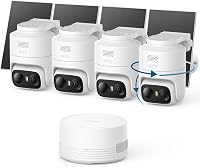
aosu D1 Classic 4-Cam Solar Camera Kit Review: Worth It? (October 2026)
The aosu D1 Classic is a four-camera wireless kit with a solar panel on each camera and a base that stores video locally, and it suits a yard with no nearby outlet. Skip it if you need a live view on a TV, a 4K image or a drive-based recorder.
On this page (15 sections)
- aosu D1 Classic at a glance
- Is aosu a good camera brand?
- What the aosu D1 Classic kit includes
- Solar charging and sunlight
- Storage and recording on the base
- Live view, the app and the base
- Night vision and the 2K image
- Install and weather
- What to check when a camera goes offline
- Setting up the aosuBase and the four cameras
- Who the D1 Classic suits
- Who should skip the aosu D1 Classic
- How the D1 Classic compares with nearby solar kits
- Our score for the D1 Classic
- Is the aosu D1 Classic worth it?
The aosu D1 Classic is a four-camera wireless kit with a solar panel on each camera and a base that stores video locally. It suits a yard where an outlet isn't close to the camera spots.
This review covers what is in the box, how the solar charging works, how the base stores footage and where the kit doesn't fit. It also compares the kit with a eufy kit and a Reolink solar kit, so you can see the trade-offs before you buy.
aosu D1 Classic at a glance
The D1 Classic pairs four 2K cameras with a base that stores up to about 120 days of loop recording, according to aosu. Each camera has its own solar panel and connects wirelessly to the base.
The card below has the key facts, and the verdict follows it.
aosu D1 Classic 4-Cam Kit

- 4 wireless cameras with built-in solar panels
- aosuBase with 32GB local storage
- 2K (3MP) cameras with color night vision
- IP65 weatherproof rating
A four-camera wireless kit with a solar panel on each camera and a base that stores video locally.
Pros
- No power cable to each camera
- Local storage with no subscription
- Pan, tilt and auto tracking
Cons
- Live view runs in the app only
- The base has no HDMI or TV output
Buy it if you want wireless cameras for a yard with no nearby outlet, and you're happy to view live footage in the app. Skip it if you need a TV or HDMI view, or 4K detail.
Is aosu a good camera brand?
aosu sells solar and battery kits for home and yard use, and the D1 Classic is its four-camera solar kit. aosu pitches the kit on the solar panel, the local base and the app.
Those are aosu's own claims, so check them against your spots. The solar charging depends on sun exposure, and the storage figure depends on the recording mode you choose.
What the aosu D1 Classic kit includes
The box holds one aosuBase, four security cameras, a charging cable with an adapter, mounting screws and an instruction manual. The base also comes with an Ethernet cable for the connection to your router.
Each camera mounts with screws, and the cameras link to the base instead of your home Wi-Fi. The system comes pre-paired, so you power on the cameras and finish the setup in the app.
Measure each spot before you mount anything. The solar panel needs a clear view of the sky, so pick a mount point that gets direct sun for part of the day.
Solar charging and sunlight
aosu says each camera has an integrated solar panel, and it needs about 3 hours of direct sunlight a day to stay charged. The panel sits on the camera body, so there are no extra solar mounts or cables.
aosu D1 Classic charging in the first week
A shaded spot can drain a solar camera over time. Check the battery level in the app after the first week, and move any camera that stays low.
For a yard with heavy shade, consider a wired kit or a plug-in kit instead. Our solar security camera systems guide covers how to judge the sun on a spot.
Storage and recording on the base
The aosuBase has 32GB of local storage. aosu says that holds about 120 days of loop recording, with the events saved as clips.
That means the base keeps recent footage and saves event clips for review. aosu says no subscription is required, so you can keep footage without a monthly plan.
Check the recording mode after install. Event-based recording saves space, but it can miss a slow move through the view.
Live view, the app and the base
The live view runs in the aosu app. The base doesn't have HDMI or TV output, so a monitor or TV can't show the cameras directly.
The app shows up to four camera feeds at once, which lets you watch the whole yard on one screen. Set the notifications so the app alerts you on motion and stays quiet on the rest.
Keep the app and the base firmware current. An update can change how the cameras pair and how the events save.
Night vision and the 2K image
The cameras record in 2K, which is 3MP. aosu says you can zoom in up to 6 times on the image.
Full-color night vision uses built-in spotlights, so the image shows color details after dark. For more discreet monitoring, the camera switches to infrared black and white.
Expect the spotlights to draw attention at night. Place the cameras where the light helps you see, and keep it off the neighbor's windows.
Install and weather
aosu says each camera mounts with three screws and takes about 5 minutes to install. The kit's cameras carry an IP65 rating, which covers rain and snow.
The base sits indoors, and its Ethernet cable runs to the router. Plan the route for that cable, since the base needs a LAN port close to the router.
Use a ladder with care, and hire a pro for mounts high on a wall or under a roof edge. Follow the mount steps in the manual before you drill.
What to check when a camera goes offline
Start with the sun. A camera that sits in shade for days may drop offline when its battery runs low, so check its charge in the app first.
Next, check the base. The base needs power and a clear connection to the router, so confirm the Ethernet cable is seated at both ends.
If one camera stays offline, move it closer to the base and re-pair it through the app. That step shows whether the problem is range or the camera itself.
Setting up the aosuBase and the four cameras
Connect the aosuBase to your router's LAN port with the included Ethernet cable, then power the base from its adapter. Let the base start fully before you add the cameras, since the base has to be ready to pair them.
The cameras come pre-paired, so you power each one on and finish the setup in the app. Keep each camera near the base during setup, then move it to its mount point once it shows in the app.
Check the sun at each mount point before you drill. A camera that sits in shade from the start may need its panel moved before the first full charge.
Who the D1 Classic suits
The D1 Classic suits a yard with several spots and no outlet near them, since each camera charges from its own panel. It also suits a buyer who wants recordings kept on a local base with no subscription.
It's a good fit for a sunny front or side yard, and the best outdoor security cameras without subscription list shows more kits that record locally. For a shady yard, a plug-in or wired kit makes more sense, and the solar security camera systems guide explains how to judge the sun on a spot.
Who should skip the aosu D1 Classic
Skip it if you need a live view on a TV or monitor, since the base has no HDMI or TV output. Skip it too if you want 4K detail, since the cameras are 2K.
It's also a poor fit for a shaded yard. A plug-in or wired kit is a safer choice for a spot that gets little sun.
How the D1 Classic compares with nearby solar kits
The eufy C37 is the closest match for a four-camera wireless kit with solar panels. It has a HomeBase Mini hub with 64GB of storage and a 2K image.
The Reolink Argus PT Ultra is a four-camera 4K wire-free kit with a wider pan range. It suits a yard that needs 4K detail more than the aosu's 2K image.
Our score for the D1 Classic
Our score weighs specs, features and buyer feedback against what you're shopping for. The aosu D1 Classic scores 8.5 for a solar yard with no cable runs, and it loses points for the live-view limit and the 2K image.
Is the aosu D1 Classic worth it?
Yes, if you want four wireless cameras with solar panels, a local base and a yard with real sun. It gives you a wire-free install with no subscription for local recording.
No, if you need a TV view, 4K detail or a shaded spot. For those needs, compare the eufy and Reolink solar kits before you buy.
Frequently asked questions
Is the aosu D1 Classic a good solar camera kit?
It suits a yard with no outlet near the cameras, since each camera charges from its own solar panel. aosu says about 3 hours of direct sunlight a day keeps each camera charged, so the spot needs real sun.
Does the aosu D1 Classic need a monthly subscription?
aosu says no subscription is required, since the base stores recordings locally on its 32GB drive. Check the app for any optional services, which aren't needed to record.
Does the aosu D1 Classic work without internet?
The base records locally, so recordings and live view on your home network don't need the internet. The base connects to your router with an Ethernet cable, and remote viewing needs that connection.
How many cameras does the aosu D1 Classic support?
aosu says one base connects up to four cameras, and the kit ships with four. The base's live view is in the app only, so plan on the app for every check.