PoE vs WiFi Camera Systems: What Is the Difference? (October 2026)
A PoE camera system sends power and video through one Ethernet cable, while a WiFi camera system sends video over a wireless link and still needs power at each camera. Pick PoE for fixed spots you can cable, and pick WiFi for a quick install with no cable runs.
On this page (13 sections)
- PoE vs WiFi camera systems: how the video travels
- PoE vs WiFi camera systems for power at each camera
- PoE vs WiFi camera systems for signal and reach
- PoE vs WiFi camera systems for storage and recording
- PoE vs WiFi camera systems for night view
- PoE vs WiFi camera systems for expansion
- PoE vs WiFi camera systems for weather
- PoE vs WiFi camera systems for a shed or garage
- PoE vs WiFi camera systems for remote viewing
- PoE vs WiFi camera systems for the first install
- Which setup fits your house?
- Our score for each kit
- PoE or WiFi: the short answer
A PoE camera system sends power and video through one Ethernet cable, while a WiFi camera system sends video over a wireless link. The power question is the one that catches most buyers: a WiFi camera still needs power at each spot.
This comparison looks at power, setup, signal and storage with one PoE kit and one WiFi kit. The goal is to help you pick the setup that suits the walls and yard you have.
 Best for a cabled setup with an NVR
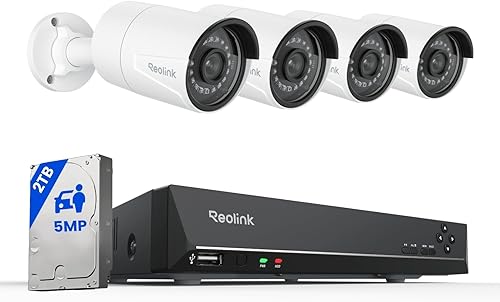
Reolink 8-Channel 5MP PoE Camera System
 Best for a quick setup with no cable runs
Hiseeu 5MP WiFi Security Camera System
PoE vs WiFi camera systems: how the video travels
A PoE camera sends its video through an Ethernet cable to an NVR, the recorder that stores the footage. The Reolink kit uses one network cable per camera, and the NVR sends the live view to a monitor or phone.
A WiFi camera sends its video over a wireless link to the NVR or your router. The Hiseeu kit uses a WiFi module in each camera, so the video doesn't need a cable run to the recorder.
Both kinds can record on a drive in the NVR. The difference is the path the video takes between the camera and the recorder.
PoE vs WiFi camera systems for power at each camera
A PoE camera draws its power from the same network cable that carries its video. The PoE port in the NVR or the switch supplies the power, so the camera spot needs no outlet.
A WiFi camera still needs power at each spot. The Hiseeu kit ships with a 12V adapter for each of its four cameras, so you need an outlet, or a long extension cord, near every camera.
That outlet need is the main trade-off. If a spot has no outlet and no cable run, a WiFi camera may need a battery or solar panel rather than the plug-in kit.
PoE vs WiFi camera systems for install work
A PoE install means running cable from each camera to the NVR. Plan the route, keep each run inside the cable's rated length, and mount the cameras after the cable is in place.
A WiFi install skips the cable run, so you can mount each camera and plug it in. The trade-off is that you still need an outlet and a clear path for the power cord.
Drilling and running cable can need a ladder and a second person. Follow the maker's install steps, and hire a pro if the job means cable through brick or a finished wall.
PoE vs WiFi camera systems for signal and reach
A PoE connection is wired, so the signal doesn't weaken with distance or walls in the same way a wireless link does. A 100 meter Ethernet run is the usual limit for a standard cable.
A WiFi link can reach across a yard, but walls, metal siding and distance can cut the signal. Hiseeu says its wireless range is more than 100 feet, which is the brand's own figure to check on site.
Test a WiFi spot before you mount the camera. Walk the camera to the mount point and check the live view on your phone first.
PoE vs WiFi camera systems for storage and recording
The PoE kit comes with a 2TB drive in its NVR. That gives room for continuous recording across several cameras before the oldest footage is overwritten.
The WiFi kit comes with a 500GB drive in its NVR. It records fine for a smaller setup, but the drive fills sooner when you add cameras.
Both kits record without a monthly cloud plan. Check the drive size and the NVR's expansion options before you choose.
PoE vs WiFi camera systems for night view
Reolink says its PoE kit uses 18 infrared LEDs for night vision up to 100 feet. The Hiseeu WiFi kit adds a floodlight and color night vision, so the view can show color on the spot the light covers.
Pick the kit that matches the night view you want. The Reolink view works across its full 100 feet in infrared, while the Hiseeu floodlight adds color for the area it lights.
Check the night view from the spot itself. A floodlight can wash out a close corner, so aim it at the path or the door, not the lens.
PoE vs WiFi camera systems for expansion
The Reolink PoE NVR has eight channels, and the kit ships with four cameras, so four more fit on the same recorder. Hiseeu says its WiFi NVR extends to 10 channels, which leaves room to add cameras later.
Plan the total count before you buy, since the recorder's channel count sets the limit. Check the drive size too, because more cameras fill a drive faster.
PoE vs WiFi camera systems for weather
Hiseeu says its WiFi cameras are IP66 waterproof, and Reolink sells its PoE cameras for outdoor use. Both kinds can sit outside once mounted correctly.
Mount each camera under an eave or a cover where rain can't run into the lens. Check the seal around each cable entry, since a wet connection is a common cause of a dropped camera.
PoE vs WiFi camera systems for a shed or garage
A shed or a detached garage often has no cable path from the house, which suits a WiFi kit. The WiFi camera still needs power at its spot, so pick a spot near an outlet or plan a solar or battery option.
A PoE run to a shed works when there's a conduit or a cable path already in place. Plan the route before you dig, and keep the cable away from anything that could damage it.
PoE vs WiFi camera systems for remote viewing
Both kinds need an internet connection for viewing from away. The PoE NVR connects to the router, and the WiFi kit's NVR does the same over its own link, so check the setup steps for each kit.
Our do PoE cameras need internet guide explains which features work offline for a PoE kit. Check the same features for the WiFi kit in its app before you rely on them.
If the house has a slow connection, test the live view from your phone over cellular before you rely on it for alerts. For more WiFi picks, see the best wireless security camera systems.
PoE vs WiFi camera systems for the first install
A PoE install starts at the NVR. Run each cable to its spot, check the live view, and only then mount the camera.
A WiFi install starts with the signal at the far spot, since that signal decides where each camera can sit. Stand each camera at its spot, check the view on your phone, and adjust before you drill the mount holes.
Which setup fits your house?
Pick PoE for a fixed setup where you can cable every camera spot to one NVR. It gives you a wired connection and power through the same cable.
Pick WiFi when the spot has no cable path and there's an outlet close by. It's the quicker install when a cable run would mean a long drill job.
- Pick PoE: when cable runs are easy and you want power and video on one wire.
- Pick WiFi: when cable is hard to run, and you can plug each camera in.
Our score for each kit
Our score weighs specs, features and buyer feedback against what you're shopping for. The Reolink PoE kit scores 8.3 for a cabled setup, and the Hiseeu WiFi kit scores 7.7 for a quick install with fewer cable runs.
PoE or WiFi: the short answer
Choose PoE when the spots can be cabled, since power and video travel on one wire and the link doesn't depend on wireless signal. Choose WiFi when a cable run is out of reach and an outlet is close by.
For more on the cable side, read our PoE camera system explainer and the wired vs wireless guide. Both help you decide before you buy a kit.
Frequently asked questions
Is a PoE camera system better than a WiFi one?
It depends on the spot, since PoE gives one cable for power and video. A WiFi camera system suits a spot where a cable run is hard, but you still need power at each camera.
Do WiFi security cameras need a power outlet?
Most do, since many WiFi kits ship with a power adapter for each camera. Check the box list, since some cameras use a battery or solar panel instead.
Does a PoE camera system need Wi-Fi?
No, a PoE system records over its own Ethernet cable to the NVR. Internet is needed only for remote viewing from away or phone alerts.
Is WiFi or PoE more reliable for a home camera?
PoE uses a wired connection between camera and recorder, so it doesn't depend on wireless signal strength. A WiFi camera can work well close to the router, but walls and distance can weaken the link, so test the spot before you mount.