Hard Drive for a Security Camera System: What Size?
Plan on at least 2TB for a 4 to 8 camera system that records 24/7, and more if you want two weeks or longer. Resolution, frame rate and recording mode all change how fast the hard drive fills.
On this page (9 sections)
Plan on at least 2TB of hard drive space for a security camera system that covers 4 to 8 cameras and records 24/7. More storage gives you longer history, and the right size depends on your camera count, resolution and recording mode.
Once the drive is full, most recorders overwrite the oldest footage first, so a bigger drive keeps video longer. The math is simple once you know the bit rate of your cameras.
Storage that kits include
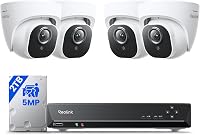
Most kits ship with a drive already installed. Reolink's 8-channel 5MP kit includes a 2TB drive, and Reolink says it keeps ten days of video without overwriting.
ANNKE's 8-channel 3K Lite DVR includes a 1TB drive. ANNKE says the recorder supports drives up to 10TB, so you can upgrade later.
Hiseeu's 8-camera 8MP analog kit includes a 3TB drive, and Hiseeu says it records about 15 days for eight cameras.
How the math works
Each camera writes a steady stream of video, measured in bit rate. The bit rate depends on resolution, frame rate, compression and how much motion the camera sees.
For an example, say each camera records at 2 Mbps. Four cameras then write about 86 GB per day, so a 1TB drive fills in about 12 days.
Double the drive to 2TB and the same four cameras keep about 23 days. Eight cameras at the same bit rate fill 2TB in about 12 days, so the camera count matters as much as the drive size.
Your recorder's settings show the real bit rate. Check the resolution and frame rate in the recording menu, since those numbers set how fast the drive fills.
Days of footage for each drive size
The table uses the example rate of 2 Mbps per camera. It shows how the drive size and the camera count work together, and your recorder's bit rate will change the numbers.
| Drive | 4 cameras | 6 cameras | 8 cameras |
|---|---|---|---|
| 1TB | about 12 days | about 8 days | about 6 days |
| 2TB | about 23 days | about 15 days | about 12 days |
| 4TB | about 46 days | about 31 days | about 23 days |
Motion-only recording can stretch these figures a lot, since the cameras write only when something moves. A 24/7 schedule uses the full figure.
Why 4K needs more space
A 4K camera records more pixels, so it writes more data than a 1080p camera at the same frame rate. The drive fills faster for the same number of days.
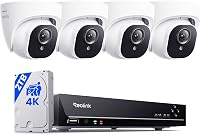
ANNKE's 8-channel 4K kit ships with a 2TB drive, and Reolink's 4K 8-channel kit does too. Plan on a drive at the top of that range if you want two weeks or more of 4K history.
Surveillance drives or desktop drives
Surveillance drives are built for long hours of writing video around the clock. Seagate describes its Skyhawk drives as built for DVR and NVR systems, with workloads of up to 180TB a year.
WD says its WD Purple drives are engineered for mainstream surveillance systems, with a workload rate of up to 180TB a year. Both brands sell these drives for security camera recorders.
Check the recorder's maximum drive size
Before you buy a drive, check what the recorder accepts. Every recorder limits the largest drive it can use, and the number of drive bays differs from model to model.
ANNKE says its 3K Lite DVR supports drives up to 10TB, and Reolink says its 4K kit can add an external drive up to 8TB. Confirm the number in the manual before you buy.
Recording mode changes the answer
A 24/7 recording mode fills the drive fastest. A motion or schedule mode records only when something moves or during set hours, so the drive lasts much longer.
Use motion-only recording for the spots where little happens. Keep 24/7 recording for the doors and driveway, where you want a full timeline.
Check the recording schedule once a month too. A schedule that changed during a holiday or a new camera setup can fill the drive faster than you planned.
Sizing a hard drive for a security camera system
Hard drive for a security camera system, step by step
Use these steps to size your drive:
- Count the cameras and their resolution.
- Pick a recording mode for each spot.
- Estimate the daily write for the whole system, using the example bit rate or your recorder's number.
- Multiply by the number of days of history you want, then round up to the next drive size.
Keep some spare space, and check the drive after the first month. If the history is shorter than you planned, move to a larger drive or switch some cameras to motion recording.
Keep the footage private
Recorded video shows people and property, so protect the recorder. Use a strong password on the recorder and the app, and keep the recorder on a network you control.
Our how many security cameras guide helps you set the camera count before you pick a drive. For the wired side, read do PoE cameras need internet or an NVR and how to install a PoE camera system, and see the best PoE camera system picks for full kits with drives included.
A drive sized to your camera count and recording mode keeps the most useful history.
Frequently asked questions
How big a hard drive do I need for four cameras?
At the example rate of 2 Mbps per camera used in this guide, four cameras recording 24/7 fill 2TB in about three weeks. Motion-only recording stretches that much further, so check the recorder's mode before you pick a drive size.
Does 4K need more storage than 1080p?
Yes, higher resolution makes each camera write more data, so the same drive fills faster on a 4K kit than on a 1080p kit. Plan a larger drive or fewer days of 24/7 recording to keep the same number of days of history.
What kind of hard drive does a security camera recorder need?
Use a drive made for surveillance or video recording, since it's built for long hours of continuous writing. A standard desktop drive can work, but a surveillance drive is the safer match for a recorder that runs around the clock.
How do I check the largest drive a recorder supports?
Read the recorder's manual for its maximum drive size and its number of drive bays. Confirm both numbers before you buy, since a drive larger than the limit may not be recognized by the recorder at all.